 Gigproof
Lyrics, chords and setlists on iPhone and iPad. Change the key on stage with two taps.
The key follows the night
Your songs are lyrics with chords, so every chord can move. When the singer wants it lower tonight, tap the key on stage, then minus, and every chord moves with it.
In a setlist the new key belongs to that entry only, so the song keeps its usual key everywhere else. If you think in numbers, show the chords as Nashville numbers: when you transpose, only the reference note moves.
I’ve been a wild rover for many’s the yearAnd I spent all my money on whiskey and beer
One setlist for the whole night
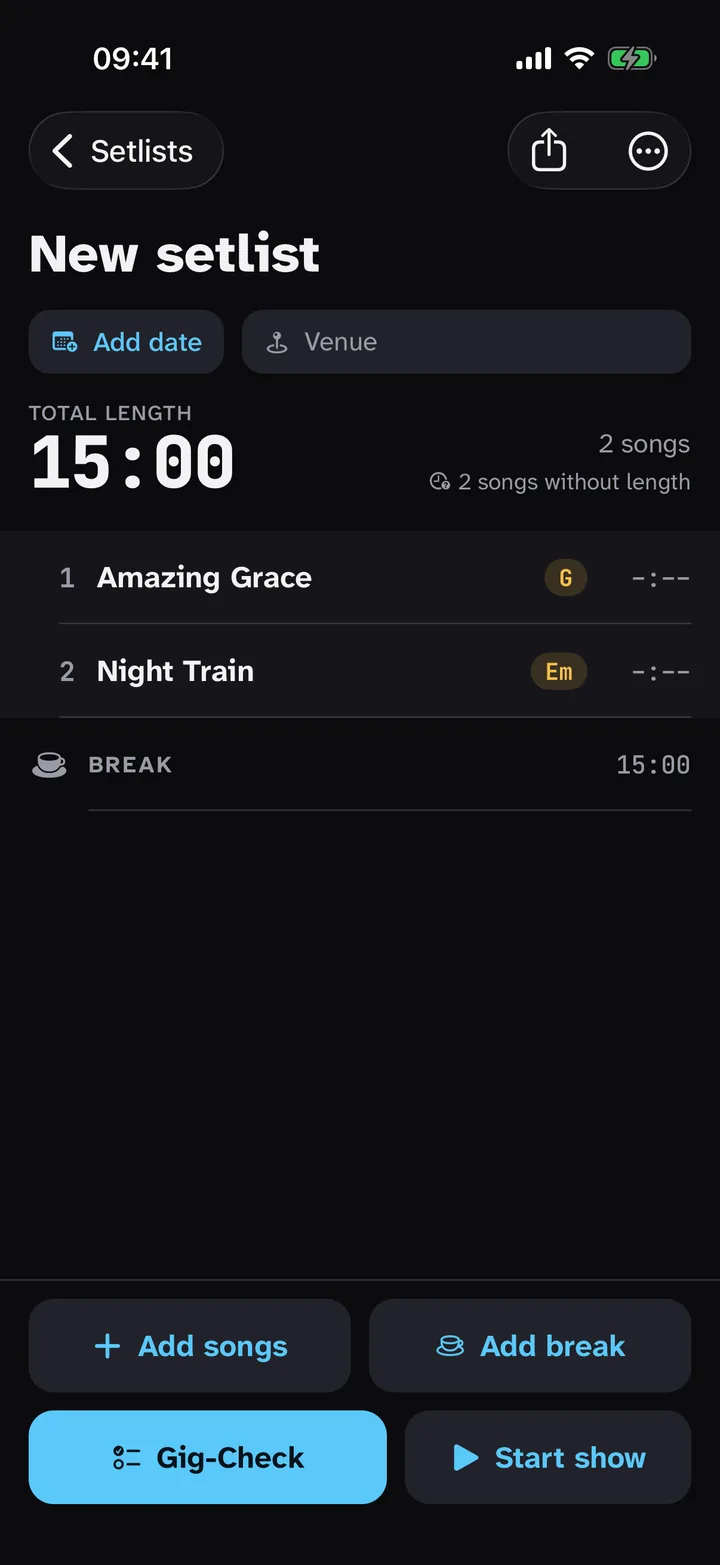
Before the gig
Put songs and breaks in order. A break splits the list into sets, and Gigproof counts the songs and the time of each set, so you see how many songs fit in a set before you leave.
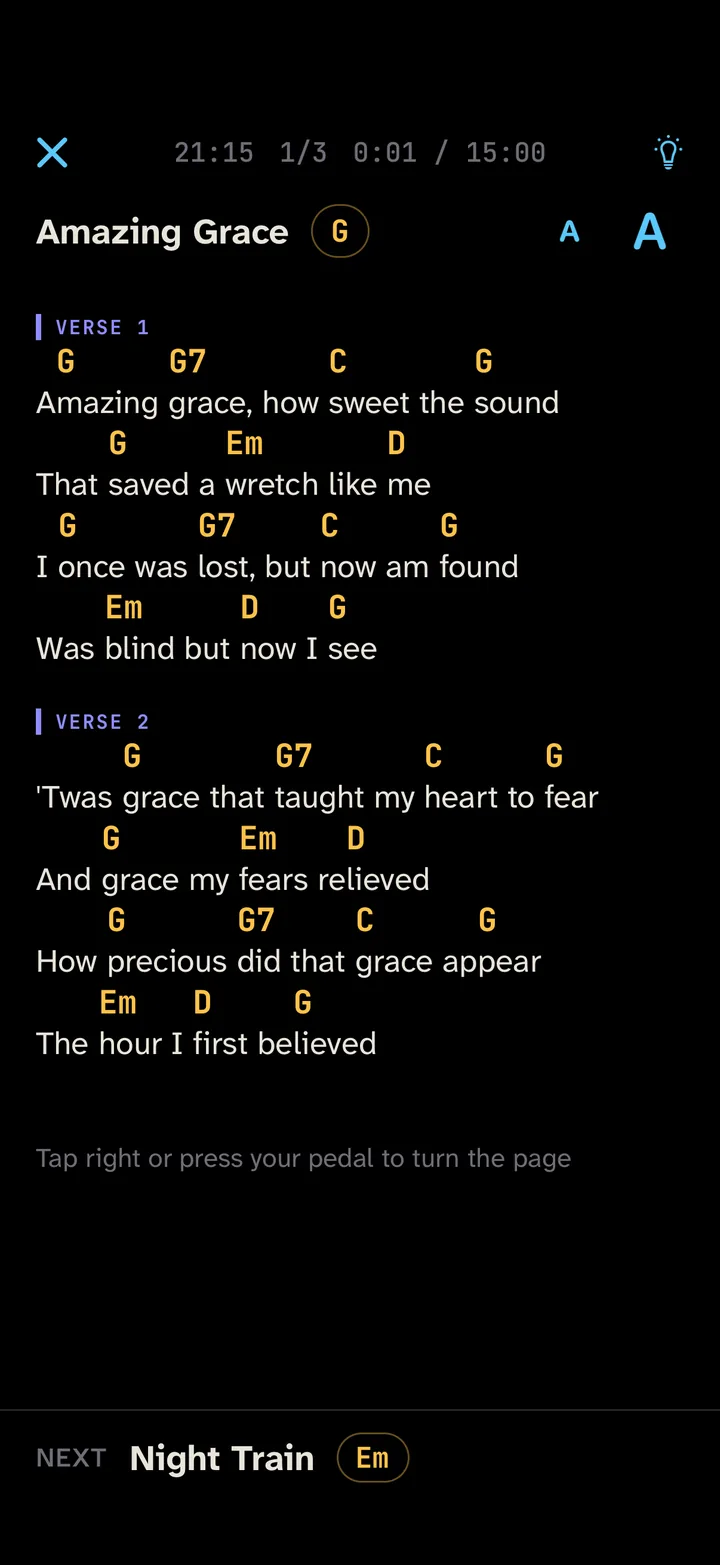
On stage
One song per screen with the next one below. Turn the page with a tap or a Bluetooth pedal; long songs turn page by page, then the next song comes up.
Your songs come with you
Bring them in
Paste a song from a chord website and Gigproof separates the chords from the lyrics. ChordPro, text and Word (.docx) files import in one go, and PDF charts stay as they are.
Take them anywhere
Export every song as a ChordPro file at any time, also in the free version. With the paid version your library is plain files in iCloud Drive as well, on your iPhone and your iPad.
Also in the app
- PDF charts
- Play scanned or printed charts in stage mode next to your text songs.
- Photo import
- A photo of a printed chart becomes text on your device. Check the chords afterwards. Paid version.
- Text size and chord colour
- Set the size per song, and pick the chord colour from twelve.
- Breaks
- Give a break a length and a countdown shows when you’re back on.
- Same page after a restart
- Close the app mid-set and it opens again on the same song and page.
- Eight languages
- English, German, French, Spanish, Italian, Dutch, Brazilian Portuguese and Japanese.
Price
Pay once. No subscription.
Renews each year until you cancel.
For the first 14 days everything is unlocked. After that, the free version keeps up to 10 songs in the library. Reading, stage mode, transposing, editing, importing and ChordPro export stay free. Over 10 songs after the trial? Nothing is deleted: you can still open, play and export all of them.
- With the paid version you also get
- more than 10 songs in the library
- sync between iPhone and iPad through iCloud Drive
- photo import
- PDF export of setlist and songs
Planned prices. They may change before launch.
Is Gigproof right for me?
It is built for musicians who read their songs as lyrics with chords. If you read sheet music as PDFs only, or your band needs charts synced between players and band management, an app made for that will suit you better.
I’m coming from another app. How do I bring my songs?
Export them from your old app as ChordPro or text files and import them in one go. If that isn’t possible, copy a song and paste it. PDF charts can be added as they are.
Which pedals work?
Bluetooth page turners set to keyboard mode — they send arrow keys, Page Up/Down, Space or Enter. Pedals in MIDI or media mode don’t turn pages, so switch yours into keyboard mode first.
Does it work without internet?
Yes. Your songs are on the device, and reading and stage mode don’t need a connection. iCloud Drive sync catches up the next time you open the app with a connection.
The app asks me to pay again.
Open the purchase screen in the app and tap “Restore purchases”. Use the Apple Account you paid with.
How do I cancel the yearly plan?
In the Settings app, tap your name, then Subscriptions, then Gigproof. Apple handles billing. Refunds are requested from Apple at reportaproblem.apple.com.
How many songs do I need for a gig?
Take the breaks off the gig length and divide the rest by the length of one song plus the gap after it. The set length calculator and song count table does it for 30 minute sets up to whole evenings.
How do I move my songs to a new device?
With the paid version and iCloud Drive sync turned on, your songs and setlists appear on any iPhone or iPad signed in to the same Apple Account. Without it, save a backup file in the app and import it on the new device.